
Advertisement
Click to download now, finish the installation quickly, and directly unlock the "all-round experience"
Advertisement
Screenshots
Click to download now, finish the installation quickly, and directly unlock the "all-round experience"
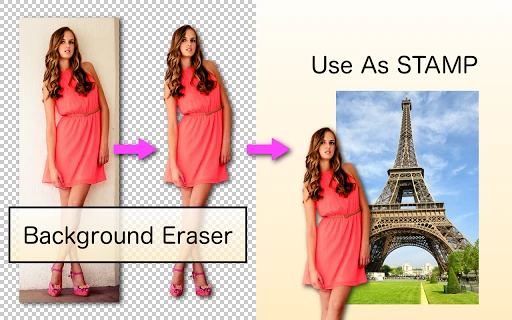
Background Eraser stands as a foundational utility within the mobile Photography landscape, specifically engineered for the high-precision task of background isolation and transparency creation. While the market is saturated with all-in-one photo suites, this application distinguishes itself by focusing purely on the "cutting" phase of digital compositing. It serves as a vital bridge for creators who need to generate high-quality PNG assets and stickers for photomontages without the overhead of complex desktop software.
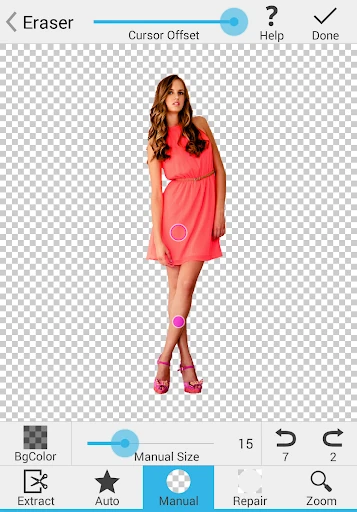
The user interface of Background Eraser is utilitarian, prioritizing functional speed over aesthetic flourish. For a photography utility, the layout is highly intuitive, placing the primary erasing tools within easy reach. The app addresses the inherent difficulty of mobile precision editing by offering a responsive zoom and a cursor offset feature, which ensures that the user’s finger never obscures the specific area being edited—a standard-setting UX choice for the category.
To remain competitive in an increasingly AI-driven market, the next update should incorporate a one-tap "AI Object Selection" tool to automate the initial cutout process. Furthermore, adding basic edge-smoothing (feathering) sliders and a small library of stock backgrounds would allow users to complete their entire creative workflow within the app rather than relying on external photomontage software.
Background Eraser is a specialized tool best suited for social media content creators, digital artists, and hobbyists who require clean assets for stickers and collages. It is highly recommended for users who value manual control and surgical precision over the often-unpredictable results of automated AI filters. If you need a dedicated, reliable utility to prepare images for compositing, this app is a top-tier choice.