Advertisement
Click to download now, finish the installation quickly, and directly unlock the "all-round experience"
Advertisement
Screenshots
Click to download now, finish the installation quickly, and directly unlock the "all-round experience"
The Mopria Print Service is a critical infrastructure tool within the Android Productivity ecosystem, designed to standardize the mobile printing experience across a vast array of hardware manufacturers. By eliminating the need for brand-specific print drivers for every individual device, it provides a streamlined, universal bridge between Android mobile devices and Mopria-certified printers. It is an essential utility for users who operate in multi-brand environments, offering a professional-grade solution that transforms a smartphone into a powerful document management hub.
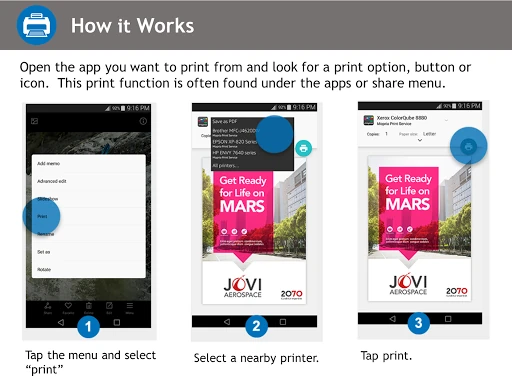
The user experience of the Mopria Print Service is intentionally unobtrusive, following the design philosophy that a utility should stay out of the user's way until needed. Rather than forcing users into a proprietary interface, it integrates directly into the native Android Print Framework. This design choice ensures that the UI remains consistent with the system's aesthetic, making the transition from digital viewing to physical printing feel like a built-in OS feature rather than a third-party add-on. Its "inconspicuous" placement within the Share menu maximizes efficiency for power users.
While the service excels in background functionality, the initial setup could be improved by including an in-app "Compatibility Checker" that automatically scans the local network and alerts the user if their printer is certified, rather than redirecting to an external website. Additionally, adding a more detailed real-time print queue monitor with ink/toner level visualizations for all connected printers would enhance its value as a central productivity dashboard.
Mopria Print Service is an indispensable tool for office professionals, students, and home-office users who require reliable, high-quality printing without the bloat of multiple brand-specific apps. It is the gold standard for mobile printing interoperability. We highly recommend this for anyone working in a modern "Bring Your Own Device" (BYOD) workplace or any user who values a unified, professional document workflow on Android.